Raast QR Payments for Businesses in Pakistan: How Dynamic QR Works in ERES
ERES now puts a dynamic Raast QR on POS receipts and sale orders. The customer scans it with their banking app, and the sale, the invoice and the ledger update on their own. Here is how it works, how Safepay fits in, what it posts to your books and how to get set up.
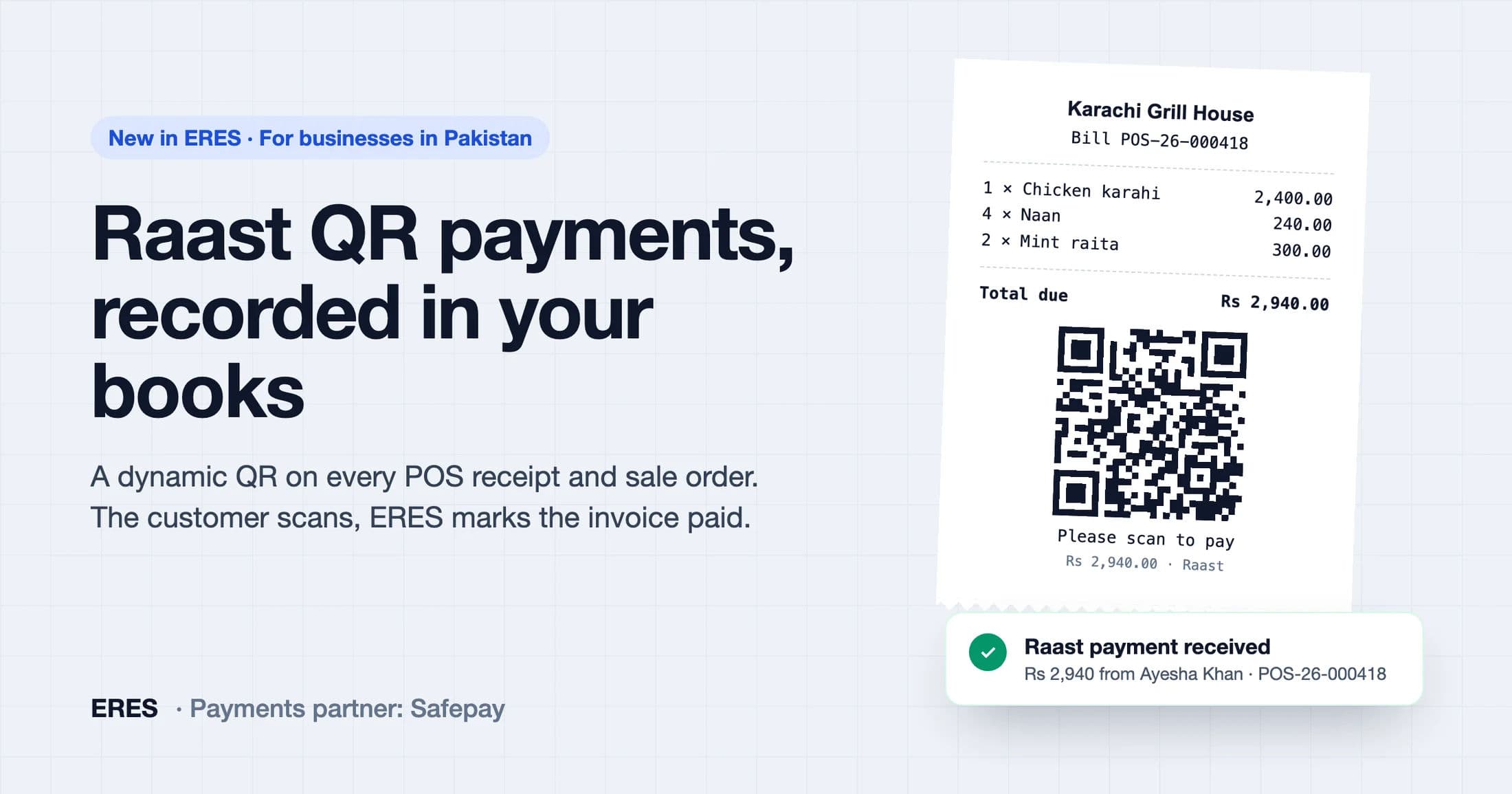
Raast QR payments let a customer pay a business by scanning a QR code with their banking app or mobile wallet. The money moves from their account to the merchant's straight away. ERES now creates a dynamic Raast QR for every POS receipt and, if you switch it on, for every sale order, and records the payment against the right invoice the moment it lands. Nobody has to check a bank app, match a screenshot or type anything in.
This post explains how it works, what happens in your books, how our payments partner Safepay fits in, and how to get your business live.
What is Raast?
Raast is the State Bank of Pakistan's instant payment system. Banks and wallets connected to Raast can send money to each other in seconds, at any hour. For businesses, the most useful part is person-to-merchant payments by QR: the shop shows a QR code, the customer scans it and confirms, and the payment is done.
Static QR vs dynamic QR
Many shops already have a static QR sticker on the counter. It works, but it leaves the hard part to you.
| Static QR on the counter | Dynamic QR from ERES | |
|---|---|---|
| Amount | The customer types it in | Already in the QR, exact to the paisa |
| Matching to the sale | By hand, from bank alerts or screenshots | Automatic, by bill |
| Invoice and books | Updated later, if someone remembers | Updated the moment it is paid |
| Who paid | Whatever the screenshot shows | The payer's name from their bank |
A dynamic QR is created for one bill. It carries that bill's amount and a reference, so the customer cannot pay the wrong amount and ERES always knows which sale the money belongs to.
At the counter: how a POS sale gets paid
- Ring up the sale. Choose Raast QR as the payment method in ERES POS. Walk-in customers are fine.
- Show or print the QR. ERES creates a QR for the bill's exact amount. It appears on screen and prints on the receipt with "Please scan to pay".
- The customer scans and pays from any Raast-enabled banking app or wallet.
- ERES records it. Within seconds the sale and its invoice are marked paid, the payment is posted, and the till plays a short chime with a "Raast payment received" notice.
The cashier does not have to wait. They can hide the QR and serve the next customer: the Raast button at the top of the POS lists every bill still waiting, shows how long each QR has left, and can show any QR again in one click.
When the customer changes their mind
If a customer decides to pay cash instead, the cashier taps Cancel QR and picks Customer pays cash instead. ERES switches the QR off so it can no longer be paid, and opens the receipt with Cash selected, ready to save. They can also cancel the QR and leave the sale unpaid on credit. If a receipt is edited or deleted, its waiting QR is cancelled automatically.
Beyond the counter: Raast QR on sale orders
Businesses that sell on credit to shops, distributors or clients can turn on Scan-to-pay QR on sale order PDF in Settings → Sale & Purchase. Every sale order you download, print or send then carries a "Scan to pay with Raast" panel at the top: the QR, the amount still owed, the order reference and the date the QR is valid until. When the customer pays, the payment is recorded on the order's invoice exactly as it is at the counter. If a QR has lapsed, printing the order again gives a fresh one for whatever is still owed.
What gets posted to your books
A Raast payment in ERES is a posted voucher, not a note on a receipt.
| Event | Debit | Credit |
|---|---|---|
| Raast sale saved | Customer receivable | Sales and sales tax |
| Customer pays the QR | Raast QR collections | Customer receivable |
The invoice shows the payment on its timeline with the payer's name, the receivable clears, and the money sits in a Raast QR collections account until Safepay settles it to your bank account.
Where Safepay fits in
ERES connects to Raast through Safepay, our payments partner. Safepay registers your business as a Raast merchant under its aggregator service, issues the dynamic QR codes ERES asks for, and settles the money you collect to the bank account you registered.
When a customer pays, Safepay sends ERES a signed payment confirmation. ERES checks the signature and that the payment belongs to your business before anything is posted, and a repeated confirmation never records the same payment twice. ERES never sees or stores your customers' banking credentials: the payment happens entirely inside their banking app.
Getting your business live
- Register inside ERES. Go to Settings → Integrations → Raast QR. Enter your business details, owners and the bank account (IBAN) payments should settle to, or pick it from your bank accounts in ERES.
- Upload your documents. Typically CNICs of the owners, an NTN certificate and a bank letter; a partnership deed or SECP documents for firms and companies. Files are stored privately.
- ERES reviews and submits. Our team checks the application and sends it to Safepay for their checks.
- Go live. Once approved, Raast QR appears as a payment method in POS, and the sale order QR can be switched on in settings.
Frequently asked questions
Which apps can customers pay with?
Any Raast-enabled banking app or mobile wallet in Pakistan, using its scan or QR payment option.
Do I need a card machine?
No. The QR is shown on the POS screen, printed by the receipt printer you already use, or included in the sale order PDF.
How long is a QR valid?
Each QR has an expiry date and time. At the counter a QR is valid for three hours. On a sale order the panel prints the date the QR is valid until. After a QR lapses, ERES issues a new one for whatever is still owed.
What if a customer pays a QR after I cancelled it?
Cancelling switches the QR off, so a new payment cannot start. If one was already under way, ERES still records it and, if the sale was settled another way, flags it so you can refund the customer or keep it as an advance.
Is Raast QR available outside Pakistan?
No. Raast is Pakistan's payment system, so this feature is for businesses that sell in Pakistani rupees and settle to a bank account in Pakistan. The rest of ERES works worldwide.
Want to see a receipt and a sale order paid by QR and posted to the books, live? Read more about Raast QR payments in ERES or book a demo.
Run your books on ERES
Accounting, inventory, POS, manufacturing, payroll and tax in one system — and an MCP server so your AI agent can use it too.